


The tools you need depend entirely on what you're trying to draw. A site plan for a housing development requires completely different instruments than presentation renderings or mechanical assembly drawings.

Architecture & Drafting Purchase Guide
There's something almost ritualistic about setting up a drafting table for the first time—the parallel bar sliding smoothly across the surface, a fresh sheet of vellum catching the light, the satisfying click of a technical pen being uncapped. Then you sit down to draft your first floor plan and reality hits: your lines wobble, your circles look more like potatoes, your lettering resembles a ransom note, and that expensive architect scale? You just realized you've been reading it backwards for the past hour.
Here's what separates frustrating technical drawing from professional work: understanding that precision isn't just about having expensive tools—it's about knowing which tools your specific project actually needs, how they work together, and why a $200 compass matters for construction documents but might be overkill for conceptual sketches. The right setup for a first-year architecture student looks nothing like what a licensed architect uses daily, and both are completely different from what a mechanical engineer needs.
The Real Deal: Even in 2025, hand drafting skills matter. Not because you'll produce construction documents by hand (you won't), but because sketching design ideas, marking up prints in the field, and understanding spatial relationships all require the same fundamental skills that come from traditional drafting practice.
Complete Guide Navigation
Your Drafting Setup: Decision Framework
Step 1: What Are You Actually Drawing?
Conceptual Design & Sketching
Early design phase is about exploring ideas quickly, not precision. You need tools that don't slow down your thinking:
- For quick ideation: Pilot G2 pens, soft graphite pencils (2B-4B), trace paper rolls
- For exploring options: Grid paper, perspective grids, cheap markers for value studies
- For client presentations: Prismacolor markers, better paper, maybe a digital tablet
- Reality check: A $200 technical pen set is wasted at this stage. Save your money.
Technical Documentation (Construction Drawings)
This is where precision matters because contractors will build from your drawings:
- For accurate measurement: Professional architect scales (Alvin 110P), engineer scales for site work
- For consistent lines: Technical pen sets with multiple nib sizes (0.25mm through 0.7mm)
- For geometric construction: Quality compass sets with extension bars, beam compasses for large radii
- For professional media: Vellum (Clearprint 1000H) or mylar film for durability
Presentation Drawings (Selling the Design)
These need to look impressive while showing design intent:
- For rendering: Copic markers in architectural grays, Prismacolor pencils for detail
- For mixed media: Watercolor supplies, mounting boards, quality paper
- For final presentation: Portfolio cases, professional mounting systems
- Modern reality: Most pros now sketch by hand, then enhance digitally in Photoshop
| Drawing Type | Common Scales | Paper Sizes | Essential Tools | Professional Brands |
|---|---|---|---|---|
| Site Plans | 1"=10', 1"=20', 1"=50' | 24"×36", 30"×42" | Engineer scales, large compass | Alvin, Staedtler, Rotring |
| Floor Plans | 1/4"=1', 1/8"=1' | 18"×24", 24"×36" | Architect scales, templates | Alvin, Koh-I-Noor, Staedtler |
| Sections/Elevations | 1/4"=1', 1/2"=1' | 18"×24", 24"×36" | Parallel bars, triangles | Mayline, Alvin, Staedtler |
| Details | 1"=1', 3"=1' | 11"×17", 18"×24" | Fine technical pens, templates | Rotring, Staedtler, Sakura |
| Mechanical Drawing | Full size, 2:1, 1:2 | 11"×17", 17"×22" | Precision instruments, dividers | Starrett, Mitutoyo, Brown & Sharpe |
Step 2: How Does This Fit Your Workflow?
Most professionals now work in a hybrid way—some things work better by hand, others digitally.
The Modern Reality:
- Concept development: Sketch by hand (faster, more intuitive), scan or photograph for digital refinement
- Production documents: Almost entirely CAD/BIM software (Revit, AutoCAD, ArchiCAD)
- Field work: Print out plans, mark them up by hand, scan markups back into project files
- Client presentations: Mix of hand renderings enhanced in Photoshop and pure digital work
What This Means for Your Tool Purchases:
If you're a student, invest in hand drafting skills—they're fundamental. If you're a working professional, you need enough hand tools for conceptual work and field documentation, but your primary investment should be in digital skills and equipment.
Frequently Asked Questions
What's the difference between architect and engineer scales?
Architect scales use fractions (1/4"=1') while engineer scales use decimals (1"=10'). Architects use their scales for buildings, engineers use theirs for site work. You'll probably need both if you're doing any kind of comprehensive project work. The Alvin 110P (architect) and 140P (engineer) are industry standards.
Do I really need expensive technical pens?
Depends on what you're drawing. For construction documents that need consistent line weights, yes—Rotring Rapidograph or Staedtler Mars 700 pens are worth it. For learning or sketching, Sakura Pigma Micron disposable pens work fine and cost a fraction of the price. Many professionals keep both: refillable pens for serious work, disposables for field sketches.
What paper should I use?
Vellum (Clearprint 1000H) is the standard for pencil work because it's translucent, takes erasures well, and reproduces cleanly. Mylar film is tougher and more archival but expensive. Bond paper works for ink. Trace paper is perfect for design development when you're layering ideas. For learning, start with trace paper—it's cheap and forgiving.
How do I choose a compass?
For professional work, get a quality set like Alvin Collegiate or Staedtler Mars Comfort with interchangeable parts and an extension bar. The cheap ones from big-box stores will frustrate you with wobbly circles. A good compass should hold its setting without creeping, have a sharp point that doesn't slip, and accept both pencil leads and technical pen adapters.
What modeling materials should I start with?
Foam core (Elmer's or Dahle brand) and basswood strips (Midwest Products) cover most basic needs. Museum board for clean presentation models, chipboard for quick study models. Don't invest in expensive materials until you know what your specific modeling style requires—everyone develops different preferences.
Has digital technology killed hand drafting?
It's transformed it, not killed it. Nobody produces construction documents by hand anymore, but hand sketching remains the fastest way to explore design ideas, and physical models still communicate spatial ideas in ways that digital models can't quite match. Think of hand skills as complementary to digital, not replaced by it.
💡 Pro Tip:
Line Weight Pro Tip: Construction documents use a hierarchy: thick lines (0.7mm) for cut elements (like walls in section), medium lines (0.5mm) for object edges you can see, and thin lines (0.25mm) for hidden elements and dimensions. This isn't arbitrary—it helps contractors read drawings quickly in the field.
Scales and Rulers: The Foundation of Accurate Drawing
Scales and rulers aren't just measuring tools—they're how you translate real-world dimensions onto paper at manageable sizes.
Professional Architect Scales:
- Alvin 110P: The industry standard triangular scale, white plastic, clearly marked
- Staedtler 987: High-contrast markings, color-coded ends, nearly indestructible
- Koh-I-Noor: Traditional ivory color, precision etched (some prefer the aesthetic)
- What matters: Clear markings, durable construction, comfortable feel—you'll use this constantly
Engineer Scales:
- Alvin 140P: Decimal divisions for site work and civil projects
- Why you need it: Site plans, topographic work, anything involving large distances
Precision Rulers:
- Alvin 240 Series: Cork-backed steel, won't slip while you're cutting
- Starrett Steel Rules: Tool-grade precision, ground edges (expensive but last forever)
- When you need them: Any time you're cutting with a knife or need dead-accurate measurements
Compasses: Drawing Perfect Circles
Compasses are deceptively simple tools that separate amateur work from professional—wobbly circles look terrible on technical drawings.
Professional Compass Sets:
- Alvin Collegiate Set: Complete professional set with extension bar for large circles
- Staedtler Mars Comfort: Quick-set mechanism (huge time-saver), interchangeable parts
- Rotring Centro: Modern design, precision engineered, pricey but excellent
- What makes them worth it: They hold their setting without creeping, points don't slip, circles come out round
Specialized Tools:
- Beam compasses: For circles too large for regular compasses (common in landscape work)
- Proportional dividers: For scaling measurements up or down (old-school but sometimes still useful)
- Drop compasses: Tiny circles for technical details
Technical Pens: Consistent Line Weights
If you're producing any kind of professional documentation, consistent line weights matter. Technical pens deliver that consistency.
| Pen Type | Line Weights | Best Applications | Professional Models |
|---|---|---|---|
| Technical Pens | 0.13mm - 2.0mm | Construction drawings, details | Rotring Rapidograph, Staedtler Mars 700 |
| Disposable Technical | 0.25mm - 0.8mm | Field work, temporary drawings | Sakura Pigma Micron, Staedtler Pigment Liner |
| Leadholders | 2mm, 3.15mm, 5.6mm | Layout work, sketching | Staedtler Mars Technico, Koh-I-Noor Leadholder |
| Mechanical Pencils | 0.3mm - 0.9mm | Precision layout, detail work | Pentel GraphGear, Rotring 600 |
Templates: Speed and Consistency
Templates and lettering guides save enormous amounts of time once you're past the learning phase.
Architectural Templates:
- Alvin Architectural Symbols: Standard fixtures, doors, windows at common scales
- Timely Templates: Furniture layouts (huge time-saver for interior work)
- When they're worth it: When you're drawing the same elements repeatedly
Geometric Templates:
- Circle templates: Clean circles without compass dimples in the paper
- Ellipse guides: True ellipses for isometric drawings (impossible to draw freehand accurately)
- French curves: Smooth transitions and irregular curves
⚠️ Important:
Tool Care Reality Check: Technical pens clog if you don't clean them properly. Compass points dull and slip if stored carelessly. Scales accumulate graphite that affects accuracy. Templates wear out and produce fuzzy edges. Budget for replacement parts and proper storage—these tools only stay precise with maintenance.
Color Systems for Design Development
Color wheels and guides help you make intentional color decisions rather than just guessing.
What Actually Matters:
- For interior design: Understanding color temperature, complementary relationships, how lighting affects color
- For visualization: Material representation, atmospheric perspective in renderings
- For landscape work: Seasonal changes, plant selection based on color bloom times
- Reality check: Most architects develop color sense through experience, not theory—tools just help organize that knowledge
Rendering Tools for Presentations
When you need to sell a design idea, your drawings need to look impressive while accurately representing what you're proposing.
Marker Systems:
- Copic Architecture Set: Warm and cool grays, architectural earth tones (expensive but refillable)
- Prismacolor Premier: Good color range, dual tips, more affordable
- Reality: Most pros now do quick marker sketches, scan them, and enhance digitally
Mixed Media Approaches:
- Traditional: Marker base, colored pencil detail, maybe airbrush for skies
- Modern hybrid: Hand sketch, scan, Photoshop enhancement, digital printing
- What works best: Whatever gets your ideas communicated clearly in the time available
Architectural Modeling Materials
Physical models still communicate spatial ideas in ways that digital models can't quite match, especially for clients.
Foam Systems:
Foam materials are lightweight, easy to work with, and forgiving for learning:
- Foam core (Elmer's, Dahle): Clean edges, easy cutting, standard for study models
- Blue/pink board: Denser foam for carving topography and massing studies
- What matters: Quality foam core has clean edges when cut—cheap stuff tears and looks awful
Wood Systems:
Balsa and basswood provide natural appearance for more refined models:
- Balsa (Midwest Products): Very light, easy to cut, looks good stained or painted
- Basswood: Finer grain, better for structural details, more expensive
- When to use: Presentation models where material quality shows
Plastic Sheets:
Acrylic and polystyrene for glazing and precise technical models:
- Plexiglas: Clear or colored, represents glass well
- Evergreen styrene: Easy to work with, holds detail, accepts glue well
- Reality check: Plastic is less forgiving than wood or foam—mistakes are harder to fix
Sustainable Practice Note
Model-making generates waste. Choose FSC-certified wood when possible, save scraps for later projects, and consider whether a digital model might serve the same purpose. Physical models have value, but they shouldn't be wasteful—plan your construction to minimize offcuts and use recyclable materials when you can.
Model Landscaping and Site Context
Landscaping elements make architectural models read as buildings in context rather than abstract objects.
What Actually Works:
- Woodland Scenics trees: Look decent at architectural scales, come in various species
- Static grass: Better than painted green that looks like carpet
- Scale figures: Help establish scale and show how spaces are used
- Reality check: Don't overdo it—simple, clean context often reads better than busy, overly detailed landscaping
Drawing Reproduction and Documentation
Reprographics—the reproduction and distribution of technical drawings—has gone almost entirely digital, but you should understand the systems.
Modern Reality:
- PDF workflows: How construction documents are actually distributed now
- Large format printing: Still needed for plan reviews and field sets
- Scanning services: Converting old drawings to digital archives
- What matters: Understanding scale relationships when printing from digital files
Drawing Papers and Films
Technical papers and films affect how your work looks and how well it reproduces.
What to Use When:
- Vellum (Clearprint 1000H): Standard for pencil work, translucent, takes erasures well, reproduces cleanly
- Trace paper: Cheap and perfect for design development when you're working through ideas
- Mylar film: Archival quality, dimensionally stable, expensive (mainly for record drawings now)
- Bond paper: For ink work and final prints
- For learning: Buy trace paper in bulk—it's cheap and you'll use tons of it
⚠️ Important:
Before You Buy Anything: Don't blow your budget on a complete professional drafting kit if you're just starting out. Start with quality basics (good scales, a reliable compass set, decent technical pens), then add specialized tools as you discover what your specific work actually requires.
Modeling Materials
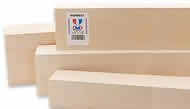
Balsa and Basswood provide lightweight, precise cutting characteristics for architectural models. Midwest Products balsa and Northeastern Scale Models basswood offer consistent grain and multiple dimensions for detailed construction.
Balsa and Basswood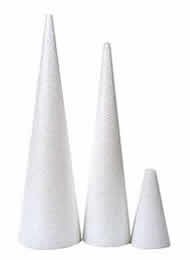
Foam Materials enable rapid prototyping and concept exploration. Elmer's Foam Core and Dow Blue Board provide different densities for various model requirements, from study models to presentation pieces.
Foam Materials
Plastic Sheets offer durability and precision for technical models. Plexiglas acrylic and Evergreen polystyrene provide clear and colored options for glazing, structural elements, and detailed components.
Plastic Sheets
Model Landscaping creates realistic site context for architectural presentations. Woodland Scenics trees and JTT Scenery Products provide scale-appropriate vegetation, terrain, and environmental elements.
Model LandscapingShop Architecture-And-Drafting Supplies
Professional architecture-and-drafting supplies for every application
Drafting and Design Applique Film
by Chartpak

1
Versions of this item
From: $43.64
Design Vellum Pad
by Clearprint

5
Versions of this item
From: $22.93
Quadrille Paper Pad 4x4 Grid
by Alvin

$13.30
Topaz Triangles
by Pacific Arc

12
Versions of this item
From: $2.50
Clear-Lay Plastic Film
by Grafix

7
Versions of this item
From: $1.89
Triangular Scholastic Scale
by Pacific Arc

$5.56
Essential Triangle Tool
by C&T

$25.95
Erasing Shield
by Pacific Arc

$1.17


